# By: Riasat Ullah
# This file contains informational content that will be sent to users after registering (by email).

from utils import url_paths


def get_disclaimer():
    content = '''
        <p style="text-align: center; font-size: 10px;">
            This message was produced and distributed by TaskCall. TaskCall is a service owned and provided by
            TaskCall Inc. To help keep your account secure, please do not forward this email.
        </p>
    '''
    return content


def get_onboarding_disclaimer(recipient_id):
    '''
    Gets the disclaimer that goes in the footer of onboarding emails.
    :param recipient_id: unique ID that identifies the email recipient
    :return: (string) html for the disclaimer
    '''
    unsubscribe_url = url_paths.web_email_subscription_cancel + '?type=onboarding&id=' + recipient_id
    content = '''
        <p style="color: white; text-align: center; font-size: 10px; margin: 0px; padding: 10%; padding-top: 20px;">
            This message was produced and distributed by TaskCall. TaskCall is a service owned and provided by
            TaskCall Inc. This email is part of a series of onboarding emails to help introduce you to
            TaskCall. They continue for a few weeks after you register your account. If you do not want to receive them
            anymore you can <a href="{0}" target="_blank" style="color: white;">unsubscribe</a>.
            <br/><br/>
            If you have any questions please contact us at: support@taskcallapp.com

        </p>
    '''.format(unsubscribe_url)
    return content


def get_social_media_links():
    '''
    Gets the social media buttons that are sent in emails.
    :return: (string) html for the social media buttons
    '''
    content = '''
        <a href="https://www.linkedin.com/company/taskcall" target="_blank" role="button" style="text-decoration: none;">
        <img src="https://taskcallapp.com/images/vendors/linkedin/LinkedInBlackIconRound.png" alt="LinkedIn Icon" height="20" width="20">
        </a>
        <a href="https://twitter.com/taskcallapp" target="_blank" role="button" style="text-decoration: none;">
        <img src="https://taskcallapp.com/images/vendors/twitter/TwitterBlackIconRound.png" alt="Twitter Icon" height="20" width="20">
        </a>
        <a href="https://www.youtube.com/channel/UCqN3kjt2tx3F-V3h1hXt4AQ" target="_blank" role="button" style="text-decoration: none;">
        <img src="https://taskcallapp.com/images/vendors/youtube/YoutubeBlackIconRound.png" alt="Twitter Icon" height="20" width="20">
        </a>
    '''
    return content


def get_onboarding_footer_content(recipient_id):
    '''
    Get the html content for the footer of onboarding emails that have both the social media links and disclaimer in
    the same div.
    :param recipient_id: unique ID that identifies the email recipient
    :return: (str) html content
    '''
    content = '''

        <div style="text-align: center;">
            {0}
        </div>
        {1}
    '''.format(get_social_media_links(), get_onboarding_disclaimer(recipient_id))
    return content


def invoice_email_content(mth_year_txt, organization_name, invoice_number):
    '''
    Content for invoice emails.
    :param mth_year_txt: month and year as text e.g. November 2022
    :param organization_name: name of the organization
    :param invoice_number: the invoice number
    :return: (tuple) -> subject, email body
    '''
    subject = 'TaskCall - Invoice is available for {0}'.format(mth_year_txt)
    content = '''
    <html>
        <body style="padding-left: 8%; padding-right: 8%; padding-top: 3%;
                padding-bottom: 3%; font-family: sans-serif; font-weight: 400; color: #606060; font-size: 14px;">
    
            <div style="text-align: center; margin: auto; width: 50%;">
                <img style="max-width: 117px; height: 20px; margin-top: 20px; margin-bottom: 20px;"
                    src="https://taskcallapp.com/images/logos/TaskCallCombinedLogo.png">
            </div>
    
            <div style="text-align: left; padding: 20px; border-top: solid; border-bottom: solid;">
                <p style="padding-bottom: 25px;">
                    Your TaskCall monthly invoice is available. Please find the
                    PDF document attached at the bottom of this email.
                </p>
                <p>
                    The balance will be automatically charged so you don’t need
                    to take any action.
                </p>
                <p style="padding: 5%;">
                    Name: {0}
                    <br/><br/>
                    Invoice number: {1}
                    <br/><br/>
                </p>
                <p>
                    If you want to view your payment history visit your account
                    by following the instructions below:

                    <ol>
                        <li>Log into your <a href="{2}">TaskCall Account</a></li>
                        <li>Go to <strong>Configurations > Organization</strong>.</li>
                        <li>Scroll down to the <strong>Billings</strong> section.</li>
                    </ol>
                </p>
            </div>

            {3}
        </body>
    </html>
    '''.format(organization_name, invoice_number, url_paths.web_login, get_disclaimer())
    return subject, content


def welcome_on_board_content():
    '''
    Content of the email that will be sent out when a new account is created.
    :return: (tuple) -> email subject, email body
    '''
    subject = 'Welcome to TaskCall'
    content = '''
    <html>
        <body style="font-family: sans-serif; font-weight: 500; color: #606060; font-size: 15px;">
            <div style="padding: 2.5%; background-color: #EAEAEA;">
                <div style="max-width: 800px; margin: auto;">
                    <div style="text-align: center; padding: 20px;">
                        <img src="https://taskcallapp.com/images/logos/TaskCallCombinedLogo.png" style="width: 120px;">
                    </div>
                    <div style="background-color: white; border-radius: 5px; padding-bottom: 60px;">
                        <div style="min-height: 300px;  background: linear-gradient(rgba(0, 0, 0, 0.1), rgba(0, 0, 0, 0.1)), url('https://taskcallapp.com/images/app/AbstractBackground.jpg'); background-size: cover; background-repeat: no-repeat; clear: both; border-radius: 5px 5px 0 0;">
                            <div style="display: block; text-align: center; padding: 5%; padding-top: 6%;">
                                <h5 style="color: white; font-size: 12px; text-transform: uppercase;"> Welcome Onboard </h5>
                                <h2 style="color: white; padding-bottom: 30px; font-size: 24px;"> Start Automating <br/> your Incident Response Today </h2>
                                <a href="https://www.taskcallapp.com/tutorials" target="_blank" style="font-size: 14px; padding: 15px 30px; border-radius: 5px; border-width: 0px; background-color: white; font-weight: 600; color: #404040; text-decoration: none;"> Watch Tutorials </a>
                            </div>
                        </div>
                        <div style="text-align: center; margin-top: 30px; padding-bottom: 20px;">
                            <img style="width: 100%;"
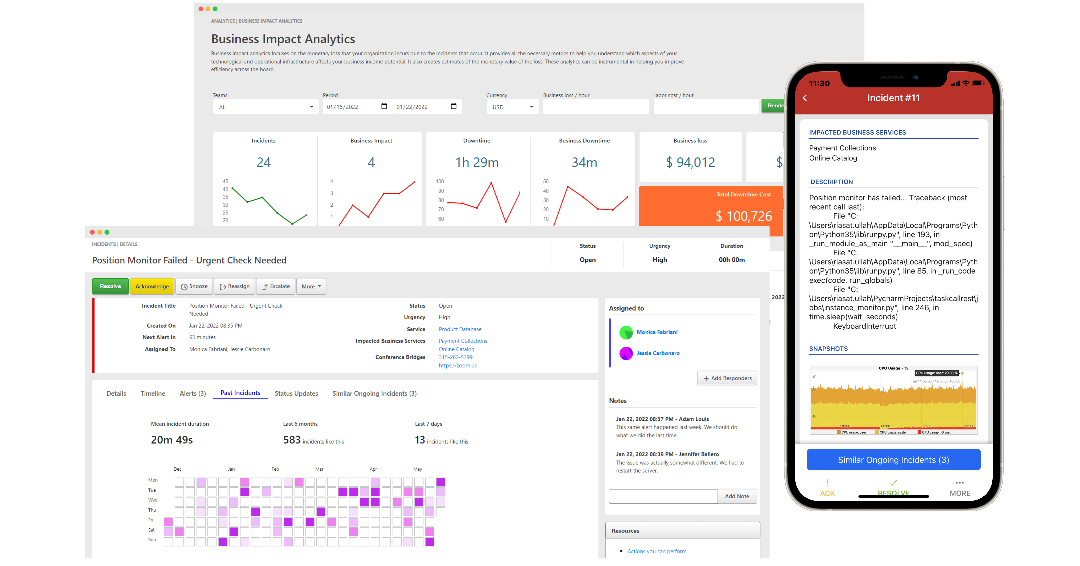
                                src="https://taskcallapp.com/images/info-site/collages/CollageIncidentsAndAnalytics.png">
                        </div>
                        <div style="text-align: center; padding: 20px;">
                            <h3 style="padding-bottom: 25px; font-weight: 600;">
                                Here are some quick tips to get you started.
                            </h3>
                            <div style="max-width: 70%; margin: auto; margin-bottom: 60px;">
                                <div style="text-align: center; margin: auto; max-width: 400px;">
                                    <div style="border-left: 3px solid #FFC300; padding: 10px; text-align: left; margin-bottom: 10px;">
                                        Download the mobile app:
                                        <a target="_blank" href="https://apps.apple.com/us/app/taskcall/id1451513745"> iOS</a>,
                                        <a target="_blank" href="https://play.google.com/store/apps/details?id=com.taskcall.taskcall&hl=en&gl=US"> Android</a>
                                    </div>
                                    <div style="border-left: 3px solid #FF5733; padding: 10px; text-align: left;
                                        margin-bottom: 10px;">
                                        Create an On-Call Routine
                                    </div>
                                    <div style="border-left: 3px solid #FF5733; padding: 10px; text-align: left;
                                        margin-bottom: 10px;">
                                        Create an Escalation Policy and add the routine to it
                                    </div>
                                    <div style="border-left: 3px solid #FF5733; padding: 10px; text-align: left;
                                        margin-bottom: 10px;">
                                        Create a Service and add the escalation policy to it
                                    </div>
                                    <div style="border-left: 3px solid #C70039; padding: 10px; text-align: left;
                                        margin-bottom: 10px;">
                                        Create your first Incident
                                    </div>
                                </div>
                            </div>
                            <a style="background-color: #4D4DFF; padding: 15px; color: white; font-weight: 600;
                                font-family: sans-serif; border-radius: 5px; text-decoration: none;"
                                href="https://docs.taskcallapp.com/getting-started/v1/quick-start-guide" role="button">
                            Quick Start Guide
                            </a>
                        </div>
                    </div>
                    {0}
                </div>
            </div>
        </body>
    </html>
    '''.format(get_disclaimer())
    return subject, content


def configurations_that_must_be_set_up(recipient_id):
    '''
    Onboarding email 1. Introduces routines, escalation policies and support hours.
    :param recipient_id: unique ID that identifies the email recipient
    :return: (tuple) -> email subject, email body
    '''
    subject = 'Onboarding: 3 Things You Must Set Up'
    content = '''
    <!DOCTYPE html>
    <html>
        <head>
            <title>Set up a rotational on-call routine and add it to an escalation policy. TaskCall will automatically escalate to the secondary if the primary on-call fails to respond.</title>
        </head>
        <body style="padding: 10%; background-color: #F3F3F3; font-family: sans-serif; font-size: 15px;">
            <div style="background-color: white; max-width: 800px; margin: auto;">
                <div style="background-color: #4076FA; padding: 40px; padding-bottom: 20px; color: white;">
                    <div style="margin-bottom: 30px;">
                        <img src="https://taskcallapp.com/images/logos/TaskCallCombinedLogoWhite.png" style="width: 100px">
                    </div>
                    <h4 style="font-size: 18px; font-weight: 600; padding: 5px 0px;">
                        Routines, Escalation Policies and Services
                    </h4>
                </div>
                <div style="background-color: white;">
                    <div style="margin: 0px; padding: 5% 8%; color: #404040;">
                        <div style="margin-bottom: 50px;">
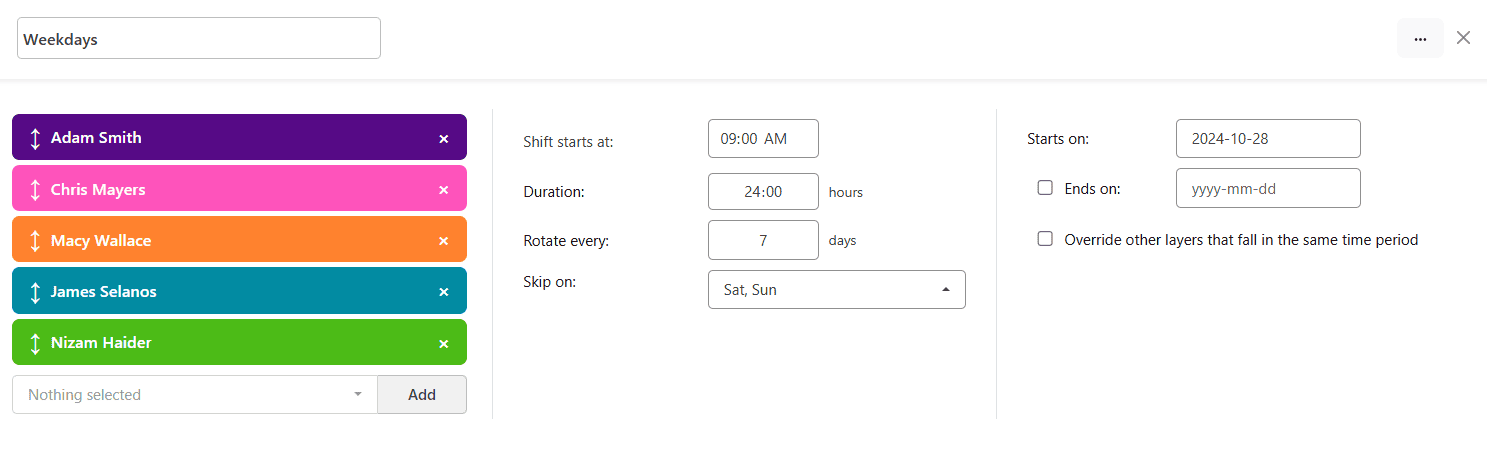
                            <h3 style="font-size: 15px;"> 1. Routines: Map out your 24 hours </h3>
                            <div style="text-align: center;">
                                <img src="https://taskcallapp.com/images/info-site/web-snapshots/routines/RoutineLayerFocused.png" style="width: 100%;">
                            </div>
                            <div>
                                <p style="font-size: 13px;">
                                    Routines have layers. Each layer is like a shift (e.g. 06:00 AM to 10:00 AM). Set them up to cover your 24 hours.
                                </p>
                                <p style="font-size: 13px;">
                                    Add people to the same layer to rotate responsibilities periodically.
                                </p>
                                <a href="https://docs.taskcallapp.com/routines/v1/on-call-schedule-examples" target="_blank" style="font-size: 11px; font-weight: 600;"> Check templates </a>
                            </div>
                        </div>
                        <div style="margin-bottom: 50px;">
                            <h3 style="font-size: 15px;"> 2. Escalation Policies: Auto-escalate to backup </h3>
                            <div style="text-align: center;">
                                <img src="https://taskcallapp.com/images/info-site/web-snapshots/escalation-policies/EscalationPolicySchedule.png" style="width: 100%;">
                            </div>
                            <div style="margin-top: 20px;">
                                <p style="font-size: 13px;">
                                    Add your team routine to an escalation policy. Make sure you have at least 2 levels of support. That way no incidents will ever be missed.
                                </p>
                                <a href="https://docs.taskcallapp.com/escalation-policies/v1/escalation-policies" target="_blank" style="font-size: 11px; font-weight: 600;"> Learn more </a>
                            </div>
                        </div>
                        <div style="margin-bottom: 50px;">
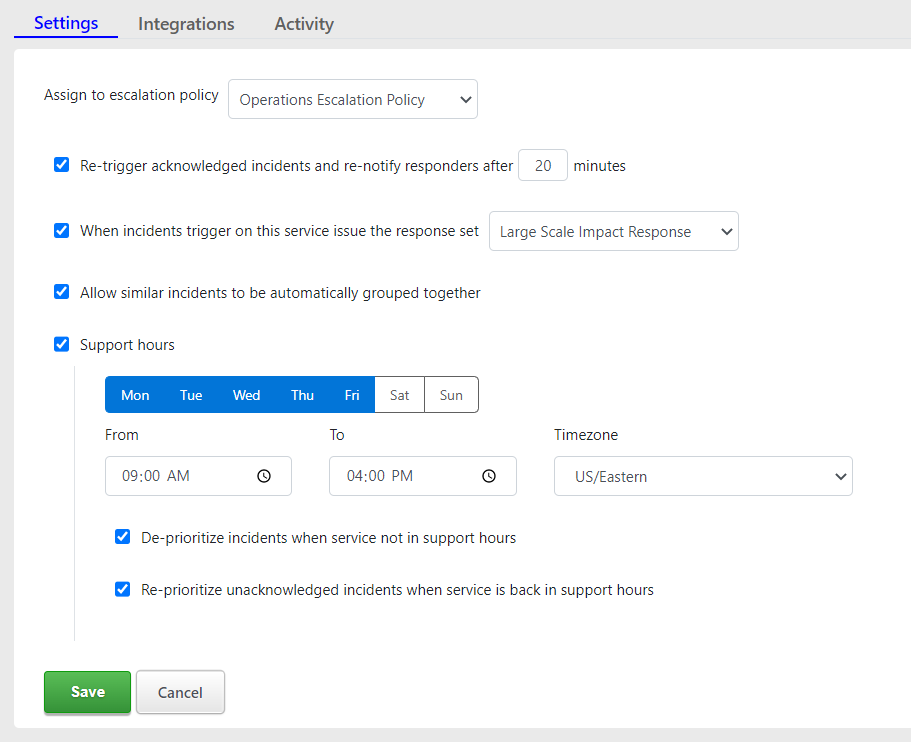
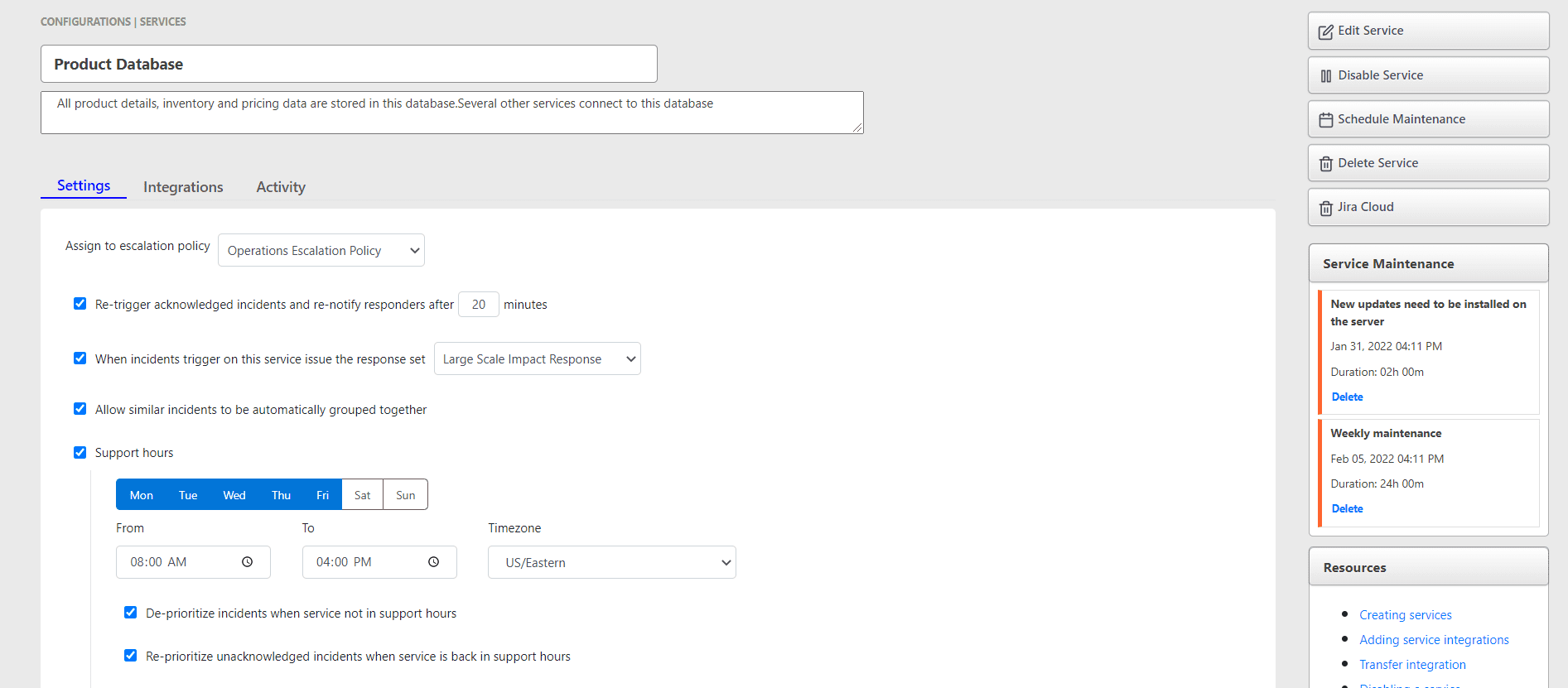
                            <h3 style="font-size: 15px;"> 3. Services - Your system components </h3>
                            <div style="padding-left: 5%; font-size: 13px;">
                                <div style="margin-bottom: 30px;">
                                    <img src="https://taskcallapp.com/images/info-site/web-snapshots/services/ServiceSettingsWithSupportHours.png" style="width: 80%; border-radius: 3px;">
                                </div>
                                <div style="margin-bottom: 40px;">
                                    <h4>
                                        3.1. Define how service incidents will be handled:
                                    </h4>
                                    <ul style="padding: 0px 18px;">
                                        <li style="padding: 0 10 10 0;">
                                            Escalation policy to assign incidents to
                                        </li>
                                        <li style="padding: 0 10 10 0;">
                                            Enable alert suppression
                                        </li>
                                        <li style="padding: 0 10 10 0;"> Support hours to avoid interruption when you are not working</li>
                                    </ul>
                                    <a href="https://docs.taskcallapp.com/services/v1/services#configure-support-hours" target="_blank" style="font-size: 11px; font-weight: 600;"> Learn more </a>
                                </div>
                                <div style="margin-bottom: 40px;">
                                    <h4>
                                        3.2. Integrate:
                                    </h4>
                                    <div style="margin: 30px 0; text-align: center;">
                                        <a href="https://docs.taskcallapp.com/integrations/v1/amazon-cloudwatch-integration-guide" target="_blank" role="button" style="text-decoration: none; padding: 2px;">
                                        <img src="https://taskcallapp.com/images/vendors/amazon/AwsIcon.png" height="35" width="58">
                                        </a>
                                        <a href="https://docs.taskcallapp.com/integrations/v1/datadog-integration-guide" target="_blank" role="button" style="text-decoration: none; padding: 2px;">
                                        <img src="https://taskcallapp.com/images/vendors/datadog/DatadogIcon.png" height="40" width="40">
                                        </a>
                                        <a href="https://docs.taskcallapp.com/integrations/v1/sentry-integration-guide" target="_blank" role="button" style="text-decoration: none; padding: 2px;">
                                        <img src="https://taskcallapp.com/images/vendors/sentry/SentryIcon.png" height="34" width="38">
                                        </a>
                                        <a href="https://docs.taskcallapp.com/integrations/v1/microsoft-azure-alerts-integration-guide" target="_blank" role="button" style="text-decoration: none; padding: 2px;">
                                        <img src="https://taskcallapp.com/images/vendors/azure/AzureIcon.png" height="35" width="35">
                                        </a>
                                        <a href="https://docs.taskcallapp.com/integrations/v1/zendesk-integration-guide" target="_blank" role="button" style="text-decoration: none; padding: 2px;">
                                        <img src="https://taskcallapp.com/images/vendors/zendesk/ZendeskIcon.png" height="35" width="35">
                                        </a>
                                        <a href="https://docs.taskcallapp.com/integrations/v1/slack-integration-guide" target="_blank" role="button" style="text-decoration: none; padding: 2px;">
                                        <img src="https://taskcallapp.com/images/vendors/slack/slack-logo.png" height="35" width="35">
                                        </a>
                                    </div>
                                    <p>
                                        Set up an email integration or pipe alerts from your monitoring tools to the service. Connect your chat-ops.
                                    </p>
                                    <a href="https://docs.taskcallapp.com/services/v1/service-integrations" target="_blank" style="font-size: 11px; font-weight: 600;"> Learn more </a>
                                </div>
                                <div style="margin-bottom: 40px;">
                                    <h4>
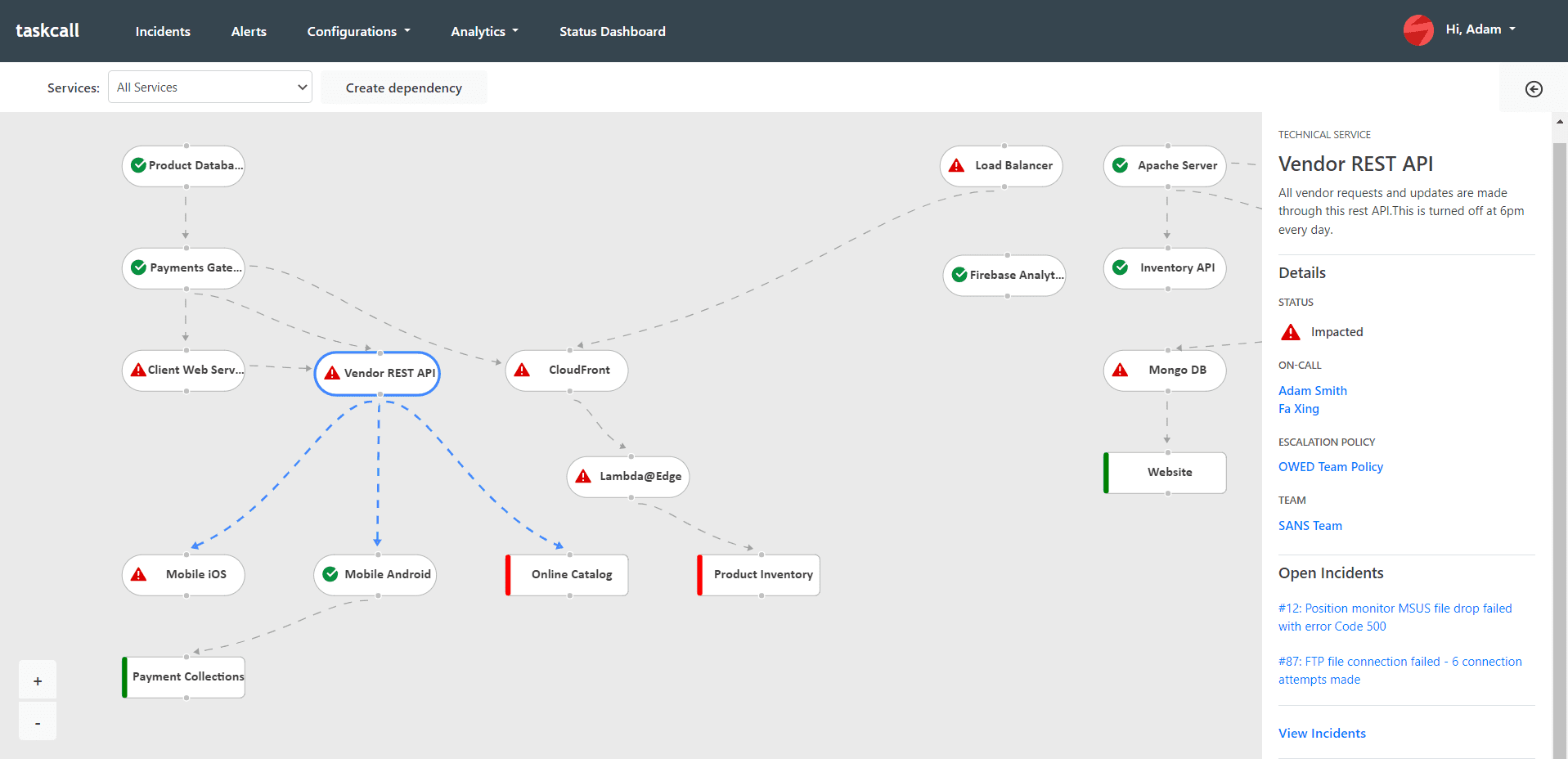
                                        3.3. Dependencies:
                                    </h4>
                                    <div style="text-align: center;">
                                        <img src="https://taskcallapp.com/images/info-site/web-snapshots/services/DependencySpecificDetails.png" style="width: 100%; border-radius: 3px;">
                                    </div>
                                    <p>
                                        Automatically identify impact on other parts of your system resulting from an incident on a service.
                                    </p>
                                    <a href="https://www.taskcallapp.com/tutorials/improve-impact-visibility-with-dependency-graph" target="_blank" style="font-size: 12px; font-weight: 600;"> Watch tutorial </a>
                                </div>
                            </div>
                        </div>
                    </div>
                </div>
                <div style="background-color: #00CC67; color: white; text-align: center; padding: 8% 10%;">
                    <p style="margin: 0px;">
                        Always add your routines to escalation policies. <br/> Incidents are created on the policies, not routines.     
                    </p>
                    <br/><br/>
                    <a href="https://www.taskcallapp.com/tutorials/how-to-set-up-multi-level-on-call-schedule" target="_blank" style="text-decoration: none; color: white;padding: 10px 20px; border: 1px solid white; border-radius: 5px;"> Watch Demo Video </a>
                </div>
                <div style="background-color: #CACACA; padding: 4%; text-align: center;">
                    {0}
                </div>
                <div style="background-color: #003366;">
                    {1}
                </div>
          </div>
        </body>
    </html>
    '''.format(get_social_media_links(), get_onboarding_disclaimer(recipient_id))
    return subject, content


def live_call_routing_content(recipient_id):
    '''
    Onboarding email 1 (if customer wants live call routing). Introduces live call routing.
    :param recipient_id: unique ID that identifies the email recipient
    :return: (tuple) -> email subject, email body
    '''
    subject = 'Onboarding: How to set up Live Call Routing?'
    content = '''
    <!DOCTYPE html>
    <html>
        <head>
            <title>With live call routing provide customer call support from wherever you are. Never miss what matters.</title>
        </head>
        <body>
            <div style="padding: 2.5%; background-color: #333333; font-family: sans-serif; font-size: 15px;">
                <div style="max-width: 800px; margin: auto">
                    <div style="background-color: white; border-radius: 20px; padding: 15px;">
                        <div style="overflow: hidden; border-radius: 10px 10px 0 0; padding: 5%; margin: auto; background: #00A86B; color: white;">
                            <div style="padding: 20px; text-align: left;">
                                <img src="https://taskcallapp.com/images/logos/TaskCallCombinedLogoWhite.png" style="width: 120px; margin-bottom: 10px;">
                                <h2 style="font-size: 28px;">How to set up Live Call Routing?</h2>
                                <div style="margin-top: 40px;">
                                    <a href="https://taskcallapp.com/products/live-call-routing" target="_blank" style="text-align: left; display: flex; float: left; margin-right: 10px; margin-bottom: 5px; padding: 5px 10px; border: 0px; border-radius: 5px; background-color: #EAE0E0; text-decoration: none;">
                                    <span style="padding: 5px 15px; color: #505050;"> Learn More </span>
                                    </a>
                                </div>
                            </div>
                        </div>
                        <div style="margin: 6%; margin-top: 30px;">
                            <div style="background-color: #EAE0E0; color: #505050; padding: 15px; border-radius: 5px; font-size: 12px;"> <span style="font-weight: 600;">Note:</span> Although a payment card is required to access live call routing, no fees will be charged during the trial after your organization is verified. </div>
                            <div style="padding: 1%; margin-bottom: 20px;">
                                <h3 style="font-size: 18px;"> 1. Create a routine: Map out your 24 hours </h3>
                                <hr style="border: 2px solid #00A86B; margin-right: 80%;"/>
                                <div style="text-align: center;">
                                    <img src="https://taskcallapp.com/images/info-site/web-snapshots/routines/RoutineLayerFocused.png" style="width: 100%;">
                                </div>
                                <div>
                                    <p style="font-size: 13px;">
                                        Routines have layers. Each layer is like a shift (e.g. 06:00 AM to 10:00 AM). Set them up to cover your 24 hours.
                                    </p>
                                    <p style="font-size: 13px;">
                                        Add people to the same layer to rotate responsibilities periodically.
                                    </p>
                                    <a href="https://docs.taskcallapp.com/routines/v1/on-call-schedule-examples" target="_blank" style="font-size: 12px; color: #00A86B;"> Check templates </a>
                                </div>
                            </div>
                            <div style="padding: 1%; margin-bottom: 20px;">
                                <h3 style="font-size: 18px;"> 2. Create escalation policy </h3>
                                <hr style="border: 2px solid #00A86B; margin-right: 80%;"/>
                                <div style="text-align: center;">
                                    <img src="https://taskcallapp.com/images/info-site/web-snapshots/escalation-policies/EscalationPolicySchedule.png" style="width: 100%;">
                                </div>
                                <div style="margin-top: 20px;">
                                    <p style="font-size: 13px;">
                                        Add your team routine to an escalation policy.
                                    </p>
                                    <p style="font-size: 13px;">
                                        Have at least 2 levels of support so calls can be forwarded to the secondary if the primary does not respond.
                                    </p>
                                    <a href="https://docs.taskcallapp.com/escalation-policies/v1/escalation-policies" target="_blank" style="font-size: 12px; color: #00A86B;"> Learn more </a>
                                </div>
                            </div>
                            <div style="padding: 1%; margin-bottom: 20px;">
                                <h3 style="font-size: 18px;"> 3. Create your services: For IVR options </h3>
                                <hr style="border: 2px solid #00A86B; margin-right: 80%;"/>
                                <div style="text-align: center; margin-top: 20px;">
                                    <img src="https://taskcallapp.com/images/info-site/web-snapshots/services/ServiceSettingsWithSupportHours.png" style="width: 70%;">
                                </div>
                                <div style="margin-top: 20px;">
                                    <p style="font-size: 13px;">
                                        Assign the escalation policy incoming calls should be assigned to.
                                    </p>
                                    <p style="font-size: 13px;">
                                        Set support hours to send callers to voicemail in off-hours.
                                    </p>
                                    <a href="https://docs.taskcallapp.com/escalation-policies/v1/escalation-policies" target="_blank" style="font-size: 12px; color: #00A86B;"> Learn more </a>
                                </div>
                            </div>
                            <div style="padding: 1%;">
                                <h3 style="font-size: 18px;"> 4. Select a phone number </h3>
                                <hr style="border: 2px solid #00A86B; margin-right: 80%;"/>
                                <p style="font-size: 13px; padding-top: 15px;">
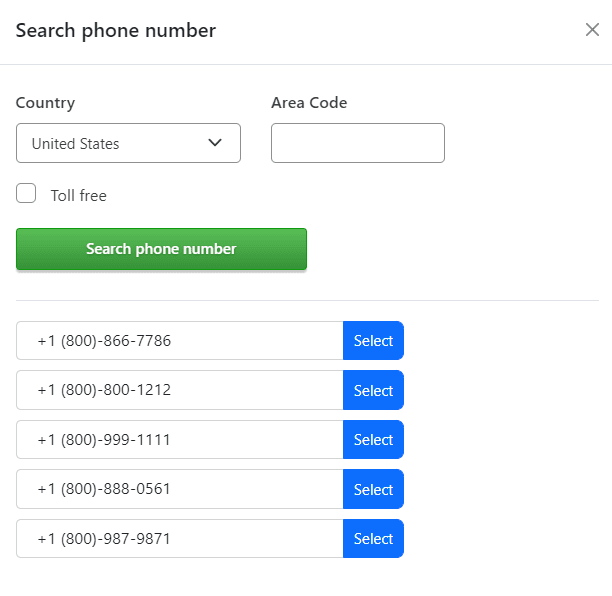
                                    Go to <strong>Configurations > Live Call Routing</strong> and select a phone number of your choosing. Calls coming in to this number will be routed to your on-call team members.
                                </p>
                                <div style="text-align: center;">
                                    <img src="https://taskcallapp.com/images/info-site/web-snapshots/live-call-routing/LiveCallRoutingSearchPhoneNumber.png" style="width: 60%;">
                                </div>
                            </div>
                            <div style="padding: 1%; margin-bottom: 10px;">
                                <h3 style="font-size: 18px;"> 5. Configure greeting and IVR options </h3>
                                <hr style="border: 2px solid #00A86B; margin-right: 80%;"/>
                                <p style="font-size: 13px; padding-top: 15px;">
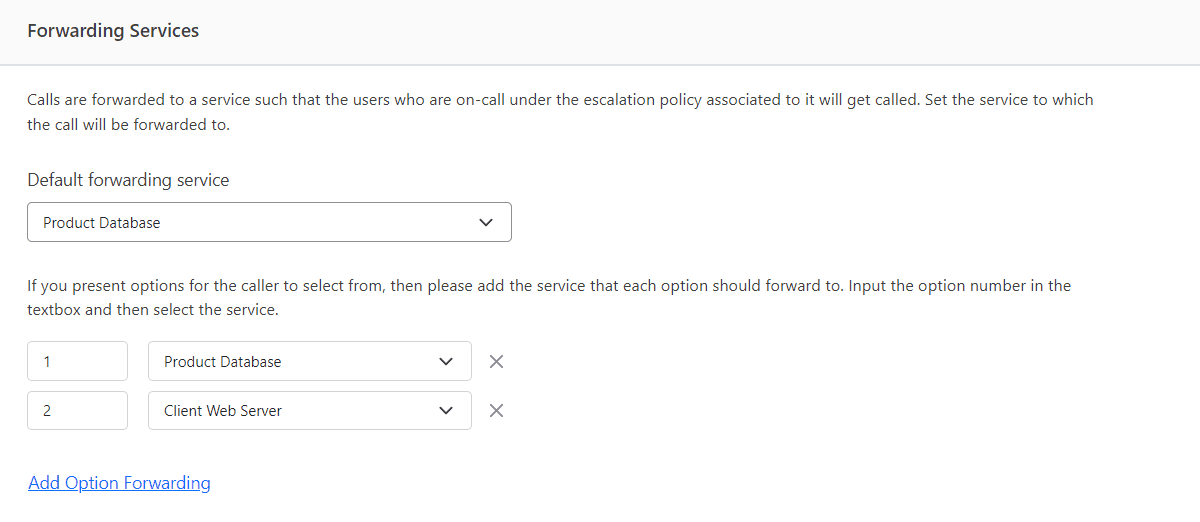
                                    Use a text-to-speech greeting or provide your own audio. Set up IVR options with the services you created.
                                </p>
                                <div>
                                    <img src="https://taskcallapp.com/images/info-site/web-snapshots/live-call-routing/LiveCallRoutingForwarding.png" style="width: 100%;">
                                </div>
                            </div>
                            <div style="padding: 1%;">
                                <h3 style="font-size: 18px;"> 6. Voice message and call recording </h3>
                                <hr style="border: 2px solid #00A86B; margin-right: 80%;"/>
                                <p style="font-size: 13px; padding-top: 15px;">
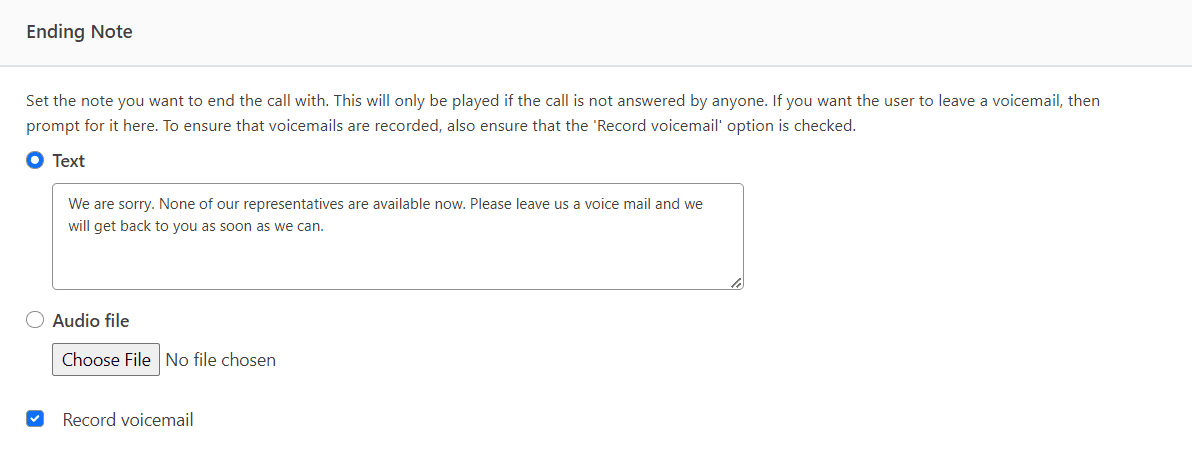
                                    Let callers leave a voice message when you are unavailable. You can also record the call itself for training purposes.
                                </p>
                                <div style="margin: 20px 0;">
                                    <img src="https://taskcallapp.com/images/info-site/web-snapshots/live-call-routing/LiveCallRoutingEnding.png" style="width: 80%;">
                                </div>
                            </div>
                            <div style="padding: 1%;">
                                <h3 style="font-size: 18px;"> 7. Instant call analytics </h3>
                                <hr style="border: 2px solid #00A86B; margin-right: 80%;"/>
                                <p style="font-size: 13px; padding-top: 15px;">
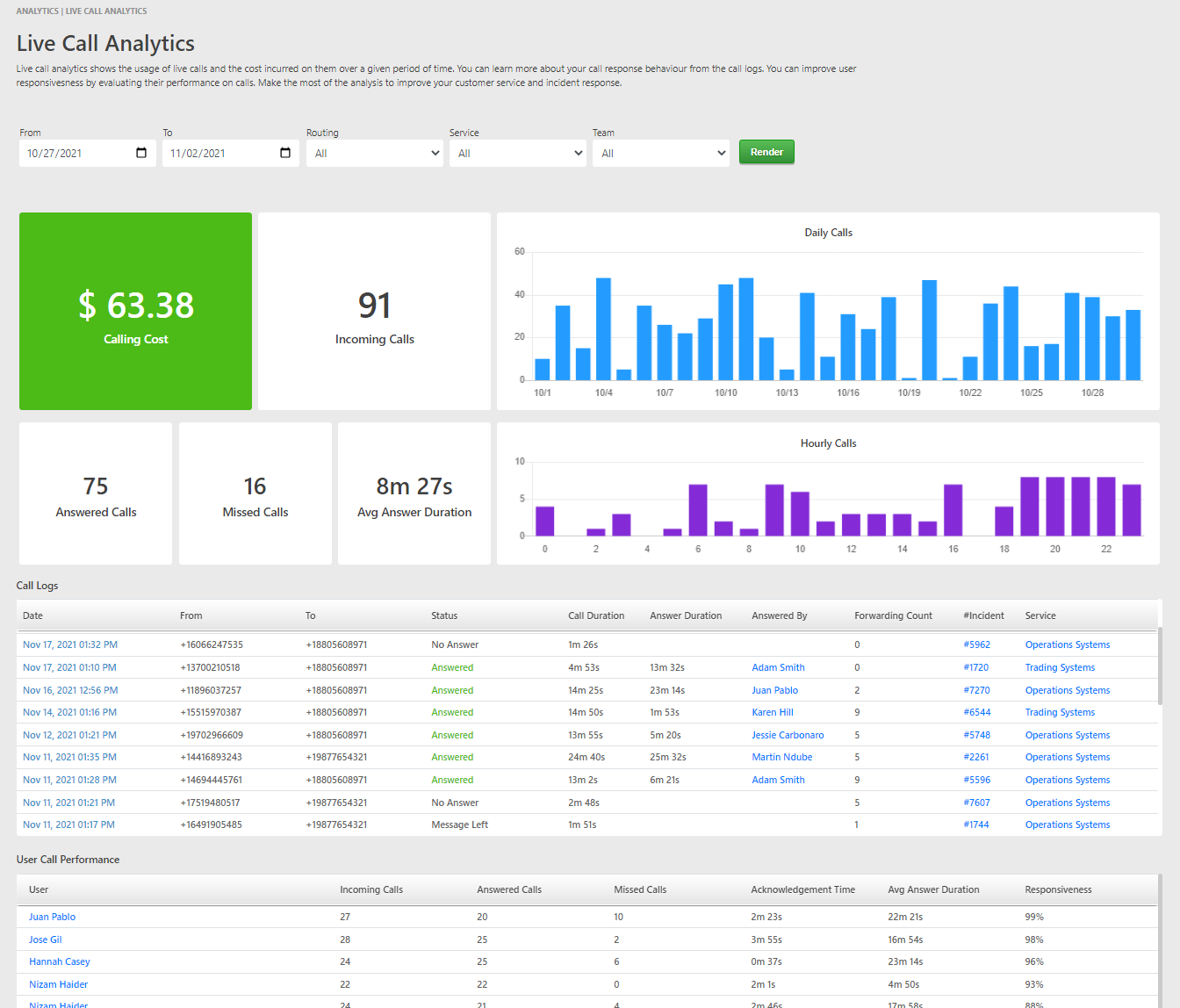
                                    Analyze how effectively your team handles calls. Get a real time view of your costs.
                                </p>
                                <div style="margin: 20px 0; text-align: center;">
                                    <img src="https://taskcallapp.com/images/info-site/web-snapshots/analytics/AnalyticsLiveCalls.png" style="width: 80%;">
                                </div>
                            </div>
                        </div>
                        <div style="background-color: #00A86B; padding-top: 50px; border-radius: 0 0 10px 10px;">
                            {0}
                        </div>
                    </div>
                </div>
            </div>
        </body>
    </html>
    '''.format(get_onboarding_footer_content(recipient_id))
    return subject, content


def incident_handling_content(recipient_id):
    '''
    Onboarding email 2. Asks users to download the mobile app.
    :param recipient_id: unique ID that identifies the email recipient
    :return: (tuple) -> email subject, email body
    '''
    subject = 'Onboarding: How to handle incidents?'
    content = '''
    <!DOCTYPE html>
    <html>
        <head>
            <title>Acknowledge. Review details and snapshots. Check system wide impact. Run diagnostics tests on your server. Add responders. Keep stakeholders updated. Resolve when you are done.</title>
        </head>
        <body style="font-family: sans-serif; font-size: 15px;">
            <div style="background-color: #333333; padding: 2%;">
                <div style="background-color: white; border-radius: 20px; padding: 15px; max-width: 800px; margin: auto;">
                    <div style="overflow: hidden; border-radius: 10px 10px 0 0; padding: 5%; margin: auto; background: #00A86B; color: white;">
                        <div style="padding: 20px; text-align: left;">
                            <img src="https://taskcallapp.com/images/logos/TaskCallCombinedLogoWhite.png" style="width: 120px; margin-bottom: 10px;">
                            <h1 style="padding-bottom: 30px;">How to handle incidents?</h1>
                            <div>
                                <a href="https://apps.apple.com/us/app/taskcall/id1451513745" target="_blank" style="text-align: left; display: flex; float: left; margin-right: 10px; margin-bottom: 5px; padding: 5px 10px; border: 0px; border-radius: 10px; background-color: #EAE0E0; text-decoration: none;">
                                <img src="https://taskcallapp.com/images/vendors/apple/AppStore.png" height="40" width="40">
                                <span style="padding: 5px 15px; color: #505050;">
                                <span style="display: block; text-transform: uppercase; font-size: 10px; font-weight: 600; color: #A0A0A0; padding: 2px 0;"> Get it on </span>
                                <span style="display: block; font-size: 14px;"> App Store </span>
                                </span>
                                </a>
                                <a href="https://play.google.com/store/apps/details?id=com.taskcall.taskcall" target="_blank" style="text-align: left; display: flex; float: left; margin-right: 10px; margin-bottom: 5px; padding: 5px 10px; border: 0px; border-radius: 10px; background-color: #EAE0E0; text-decoration: none;">
                                <img src="https://taskcallapp.com/images/vendors/google/PlayStore.png" height="35" width="35">
                                <span style="padding: 5px 15px; color: #505050;">
                                <span style="display: block; text-transform: uppercase; font-size: 10px; font-weight: 600; color: #A0A0A0; padding: 2px 0;"> Get it on </span>
                                <span style="display: block; font-size: 14px;"> Google Play </span>
                                </span>
                                </a>
                            </div>
                        </div>
                    </div>
                    <div style="margin: 2% 5%; padding: 1%;">
                        <div>
                            <h3 style="font-size: 18px"> Basic Incident Flow </h3>
                            <hr style="border: 2px solid #00A86B; margin-right: 80%;"/>
                        </div>
                        <div style="margin: 20px 0; text-align: center;">
                            <img src="https://taskcallapp.com/images/info-site/collages/CollageIncidentNotificationChannels.png" style="width: 80%; max-width: 500px;">
                        </div>
                        <div style="padding-bottom: 0; font-size: 13px;">
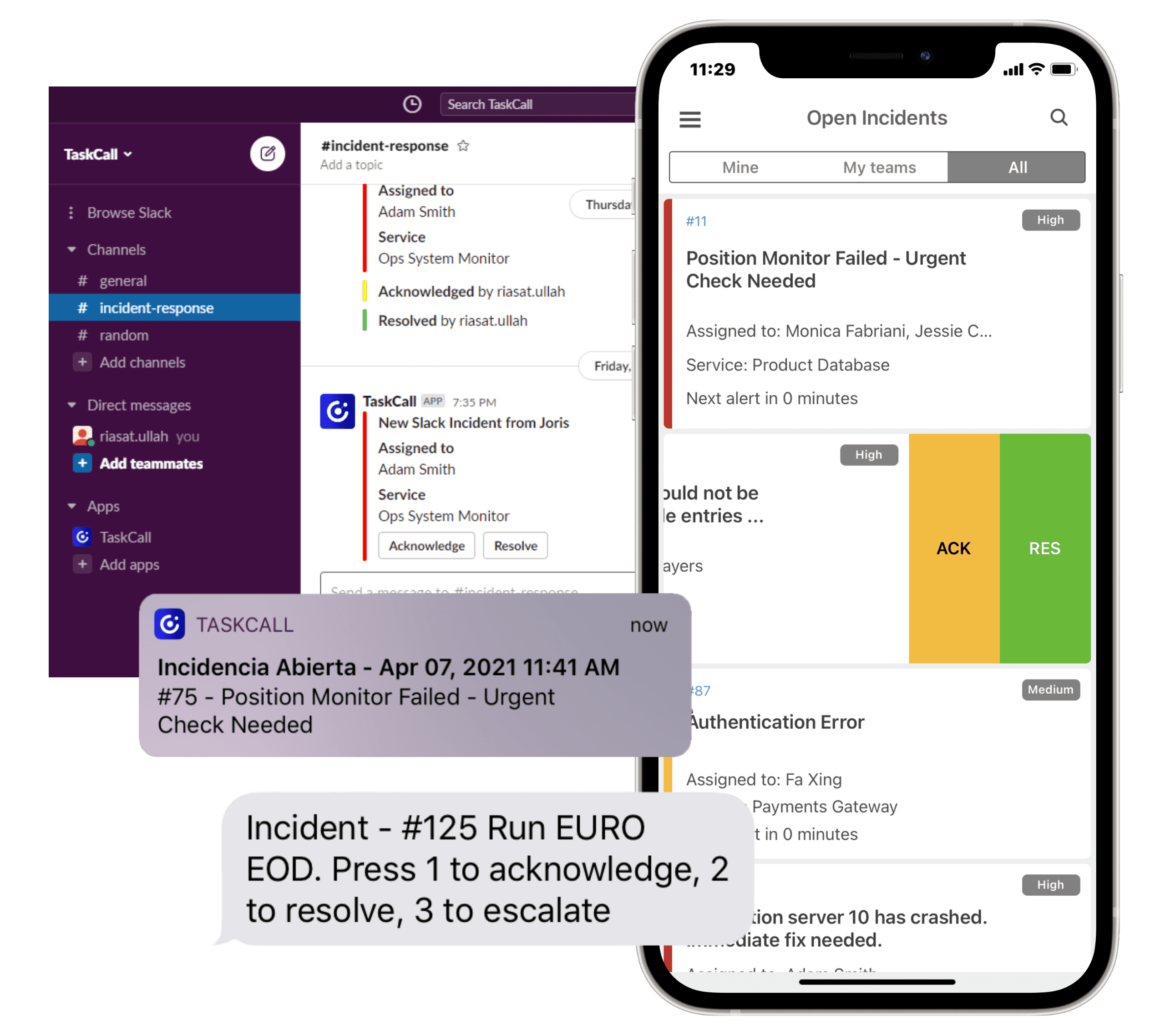
                            <div style="padding: 10px 0px;">	<b>Get notified</b> by push notifications, SMS, voice calls and chat-ops. </div>
                            <div style="padding: 10px 0px;">	<b>Acknowledge</b> so everyone knows you are working on the incident. </div>
                            <div style="padding: 10px 0px;">	<b>Review incident details</b> and snapshots to understand the problem. </div>
                            <div style="padding: 10px 0px;">	<b>Reassign or add responders</b> if you are stuck. </div>
                            <div style="padding: 10px 0px;">	<b>Escalate</b> to your backup support if you cannot respond. </div>
                            <div style="padding: 10px 0px;">	<b>Resolve</b> when you are done. </div>
                        </div>
                    </div>
                    <div style="margin: 2% 5%; padding: 1%;">
                        <div>
                            <h3 style="font-size: 18px"> Run Diagnostics </h3>
                            <hr style="border: 2px solid #00A86B; margin-right: 80%;"/>
                        </div>
                        <div style="padding-bottom: 0; font-size: 13px;">
                            <p> Without having to manually go through your system part by part, quickly run a diagnostic test from the tip of your fingers with our Rundeck integration. </p>
                            <a href="https://docs.taskcallapp.com/integrations/v1/rundeck-integration-guide" target="_blank" style="font-size: 12px; color: #00A86B;"> Learn more </a>
                        </div>
                    </div>
                    <div style="margin: 2% 5%; padding: 1%;">
                        <div>
                            <h3 style="font-size: 18px"> Custom Actions </h3>
                            <hr style="border: 2px solid #00A86B; margin-right: 80%;"/>
                        </div>
                        <div style="padding-bottom: 0; font-size: 13px;">
                            <p> Execute actions on your own servers securely with TaskCall. For example, restarting a server or changing the limit of a parameter. </p>
                            <a href="https://docs.taskcallapp.com/incidents/v1/custom-incident-actions" target="_blank" style="font-size: 12px; color: #00A86B;"> Learn more </a>
                        </div>
                    </div>
                    <div style="margin: 2% 5%; padding: 1%;">
                        <div>
                            <h3 style="font-size: 18px"> Run Multiple Actions Together </h3>
                            <hr style="border: 2px solid #00A86B; margin-right: 80%;"/>
                        </div>
                        <div style="padding-bottom: 0; font-size: 13px;">
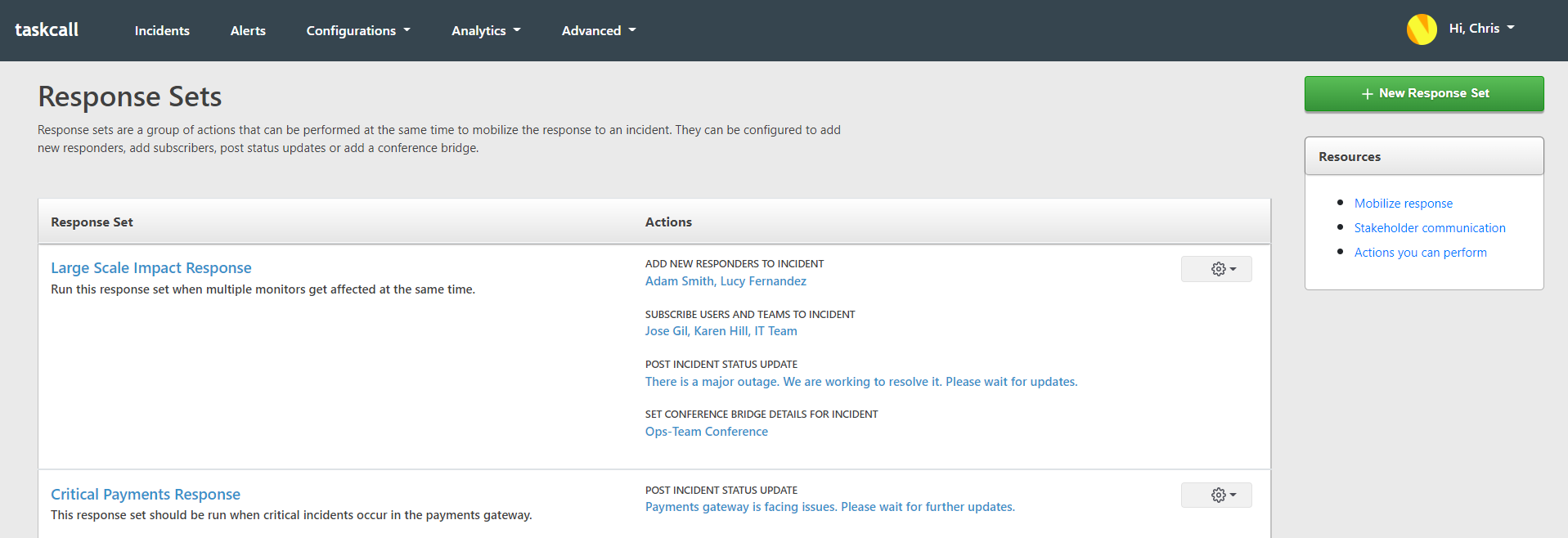
                            <p> Using response sets run several actions at the same time with a click of a button. Automate the process of assembling your team and notifying stakeholders, so you can spend more time on resolving incidents instead. </p>
                            <a href="https://docs.taskcallapp.com/incidents/v1/response-sets" target="_blank" style="font-size: 12px; color: #00A86B;"> Learn more </a>
                            <div style="margin: 20px 0; text-align: center;">
                                <img src="https://taskcallapp.com/images/info-site/web-snapshots/response-sets/ResponseSetList.png" style="width: 100%; max-width: 500px; border-radius: 3px;">
                            </div>
                        </div>
                    </div>
                    <div style="margin: 2% 5%; padding: 1%;">
                        <div>
                            <h3 style="font-size: 18px"> Search Faster with Tags </h3>
                            <hr style="border: 2px solid #00A86B; margin-right: 80%;"/>
                        </div>
                        <div style="padding-bottom: 0; font-size: 13px;">
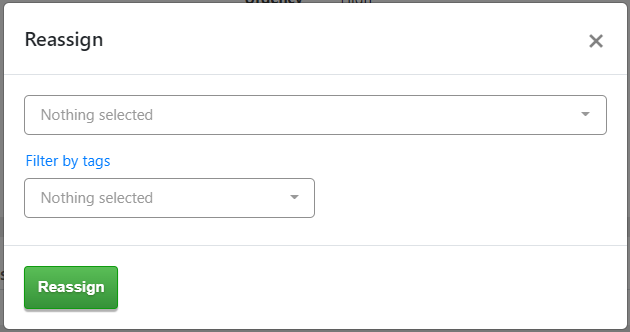
                            <p> Find the right point of support faster by filtering with tags. </p>
                            <a href="https://docs.taskcallapp.com/incidents/v1/contextual-search-and-tagging" target="_blank" style="font-size: 12px; color: #00A86B;"> Learn more </a>
                            <div style="margin: 20px 0; text-align: center;">
                                <img src="https://taskcallapp.com/images/info-site/web-snapshots/tags/TagReassign.png" style="width: 80%; max-width: 400px; border-radius: 3px;">
                            </div>
                        </div>
                    </div>
                    <div style="background-color: #00A86B; margin-top: 50px; padding-top: 50px; border-radius: 0 0 10px 10px;">
                        {0}
                    </div>
                </div>
            </div>
        </body>
    </html>
    '''.format(get_onboarding_footer_content(recipient_id))
    return subject, content


def auto_identify_system_impact_content(recipient_id):
    '''
    Onboarding email 3. Talks about identifying system impact, past incidents and similar ongoing incidents.
    :param recipient_id: unique ID that identifies the email recipient
    :return: (tuple) -> email subject, email body
    '''
    subject = 'Onboarding: Automatically identify system impact and similarities'
    content = '''
    <!DOCTYPE html>
    <html>
        <head>
            <title>TaskCall automatically identifies impact across your system from an incident so you can visualize the impact and find the root cause faster.</title>
        </head>
        <body>
            <div style="padding: 2.5%; background-color: #EAEAEA; font-family: sans-serif; font-size: 15px;">
                <div style="background-color: white; max-width: 800px; margin: auto;">
                    <div style="overflow: hidden; padding: 5%; margin: auto; background: #06C258; color: white; background-image: radial-gradient(white 1px, transparent 0); background-size: 25px 25px; background-position: -1px -1px;">
                        <div style="padding: 20px; width: 80%; text-align: left;">
                            <img src="https://taskcallapp.com/images/logos/TaskCallCombinedLogoWhite.png" style="width: 120px; margin-bottom: 10px;">
                            <h1 style="font-size: 28px;"> Find impact on dependencies and learn from similar incidents </h1>
                        </div>
                    </div>
                    <div style="margin: 10%; margin-top: 20px;">
                        <table style="width: 100%; table-layout: fixed; font-size: 14px; color: #606060;">
                            <tr>
                                <td style="padding: 2%; text-align: left;">
                                    <h4 style="text-transform: uppercase; color: #505050; font-weight: 600; font-size: 16px;"> Visualize Impact </h4>
                                    <p style="font-size: 14px;"> TaskCall automatically evaluates and identifies the impact of an incident on all connected parts of your system. The list of impacted technical and business services are shown on the incident details page. Visualize how it spreads to other components from the dependency graph. </p>
                                    <a href="https://www.taskcallapp.com/tutorials/improve-impact-visibility-with-dependency-graph" target="_blank" style="font-size: 12px; color: #06C258;">Wacth Video Tutorial</a>
                                </td>
                            </tr>
                            <tr>
                                <td style="text-align: center; padding: 2%;">
                                    <img src="https://taskcallapp.com/images/info-site/web-snapshots/services/DependencySpecificDetails.png" width="100%" style="border-radius: 5px;">
                                </td>
                            </tr>
                            <tr>
                                <td style="padding: 2%; padding-top: 50px; text-align: left;">
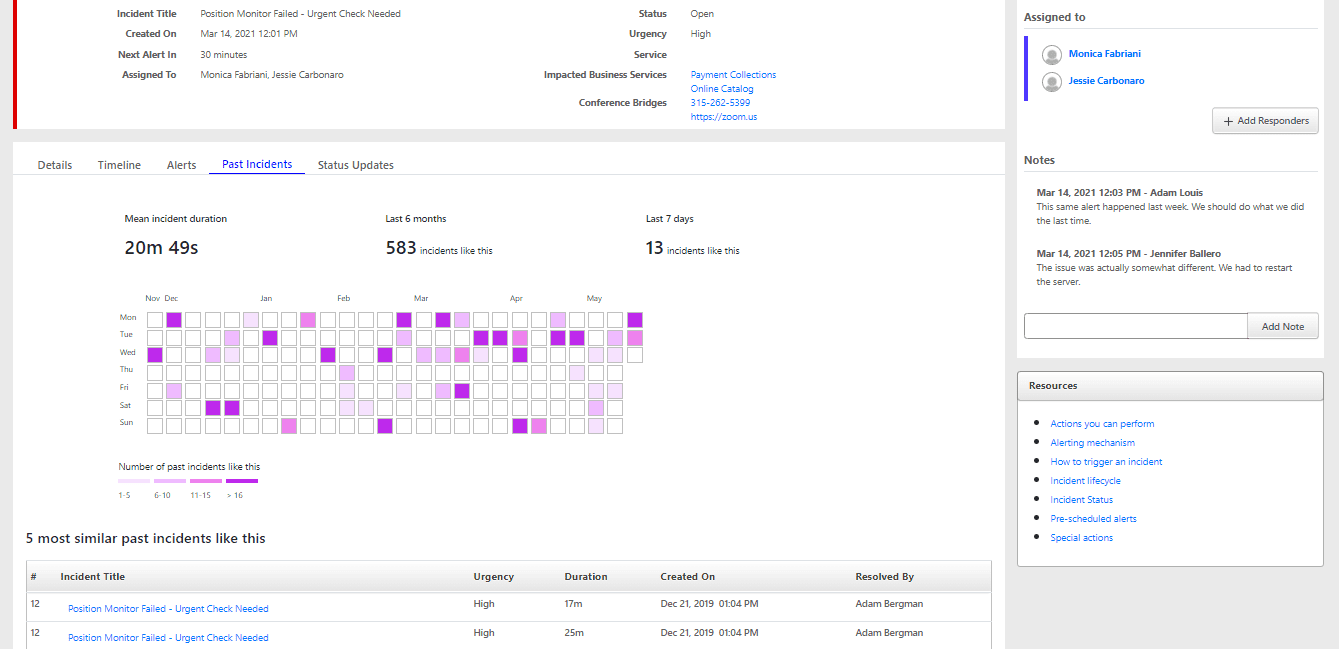
                                    <h4 style="text-transform: uppercase; color: #505050; font-weight: 600; font-size: 16px;"> Learn from Past Incidents </h4>
                                    <p style="font-size: 14px;"> TaskCall automatically analyzes data to find similarities across incidents and present them to you so you can see what was done in the past to resolve the issue. </p>
                                    <a href="https://taskcallapp.com/products/incident-management" target="_blank" style="font-size: 12px; color: #06C258;"> Learn More</a>
                                </td>
                            </tr>
                            <tr>
                                <td style="text-align: center; padding: 2%;">
                                    <img src="https://taskcallapp.com/images/info-site/web-snapshots/incidents/IncidentDetailsPastFocused.png" width="100%" style="border-radius: 5px;">
                                </td>
                            </tr>
                            <tr>
                                <td style="padding: 2%; padding-top: 50px; text-align: left;">
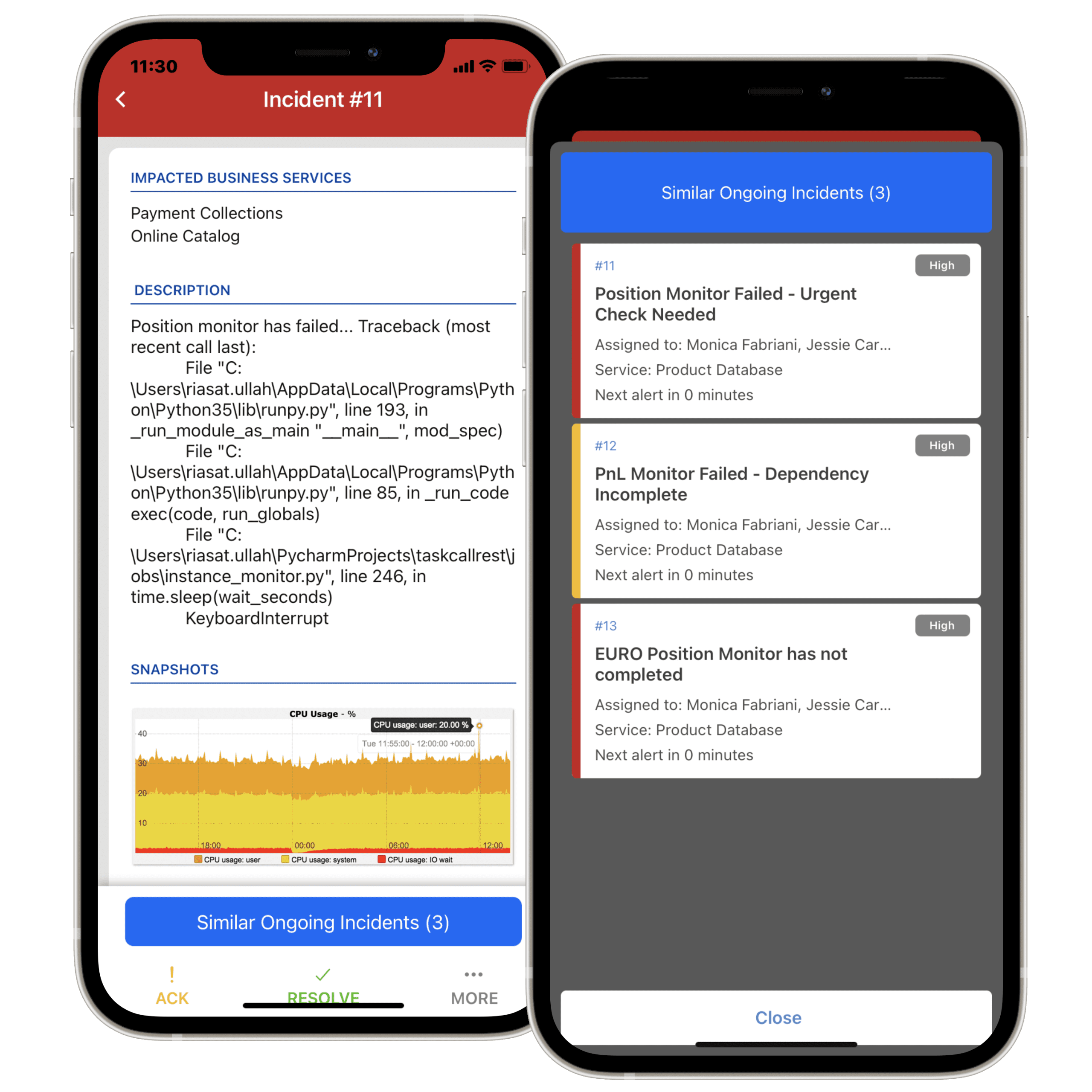
                                    <h4 style="text-transform: uppercase; color: #505050; font-weight: 600; font-size: 16px;"> Know about Similar On-going Incidents </h4>
                                    <p style="font-size: 14px;"> TaskCall will automatically identify and ensure you know when there are other similar incidents going on at the same time. This will help you take a more wholesome approach to the solution and cooperate with other teams. </p>
                                    <a href="https://taskcallapp.com/products/incident-management" target="_blank" style="font-size: 12px; color: #06C258;"> Learn More</a>
                                </td>
                            </tr>
                            <tr>
                                <td style="text-align: center; padding: 2%;">
                                    <img src="https://taskcallapp.com/images/info-site/collages/CollageMobileIncidentSimilarity.png" width="100%" style="border-radius: 5px;">
                                </td>
                            </tr>
                        </table>
                    </div>
                    <div style="background-color: #06C258; padding-top: 50px;">
                        {0}
                    </div>
                </div>
            </div>
        </body>
    </html>
    '''.format(get_onboarding_footer_content(recipient_id))
    return subject, content


def conditional_routing_content(recipient_id):
    '''
    Onboarding email 4. Introduces conditional routing and AI alert grouping.
    :param recipient_id: unique ID that identifies the email recipient
    :return: (tuple) -> email subject, email body
    '''
    subject = 'Onboarding: Content Based Incident Delegation'
    content = '''
    <!DOCTYPE html>
    <html>
        <head>
            <title>Handle monitor alerts based on the content. Dictate how alerts should be handled if certain conditions are met.</title>
        </head>
        <body>
            <div style="padding: 2.5%; background-color: #F3F3F3; font-family: sans-serif; font-size: 15px;">
                <div style="max-width: 800px; margin: auto;">
                    <div style="background-color: #000080; padding: 40px; color: white;">
                        <div style="text-align: center; margin-bottom: 30px;">
                            <img src="https://taskcallapp.com/images/logos/TaskCallCombinedLogoWhite.png" style="width: 100px">
                        </div>
                        <h4 style="font-size: 20px; text-transform: uppercase; font-weight: 600; text-align: center; padding: 5px 0px;">
                            Conditional Routing
                        </h4>
                        <hr style="border-top: 1px solid white; margin: 0 40%;"/>
                        <p style="font-size: 14px; padding: 5px; text-align: center;">
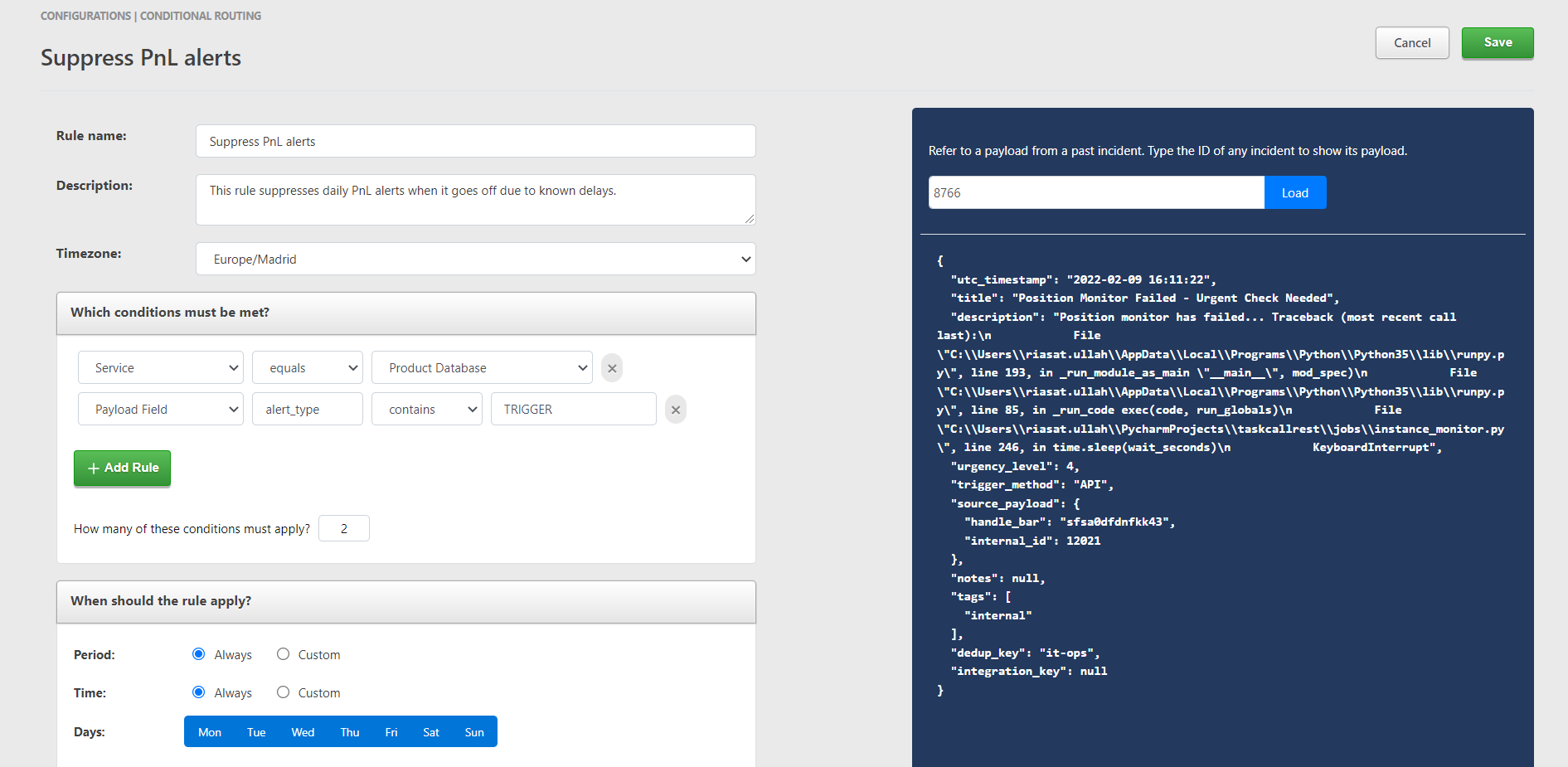
                            Handle monitor alerts based on the content. Dictate how alerts should be handled if certain conditions are met.
                        </p>
                    </div>
                    <div style="background-color: white;">
                        <div style="margin: 0px; padding: 5% 10%;">
                            <div style="margin-bottom: 50px;">
                                <h5 style="font-size: 16px;"> Content based delegation </h5>
                                <div>
                                    <img src="https://taskcallapp.com/images/info-site/web-snapshots/conditional-routing/ConditionalRoutingDetails.png" style="width: 100%;">
                                </div>
                                <div>
                                    <p style="font-size: 13px;">
                                        Delegate incidents to different responders based on the source or the presence of certain values in the body of the alert.
                                    </p>
                                    <a href="https://www.taskcallapp.com/tutorials/content-based-delegation-with-conditional-routing" target="_blank" style="font-size: 12px; font-weight: 600;"> Watch Demo </a>
                                </div>
                            </div>
                            <div style="margin-bottom: 50px;">
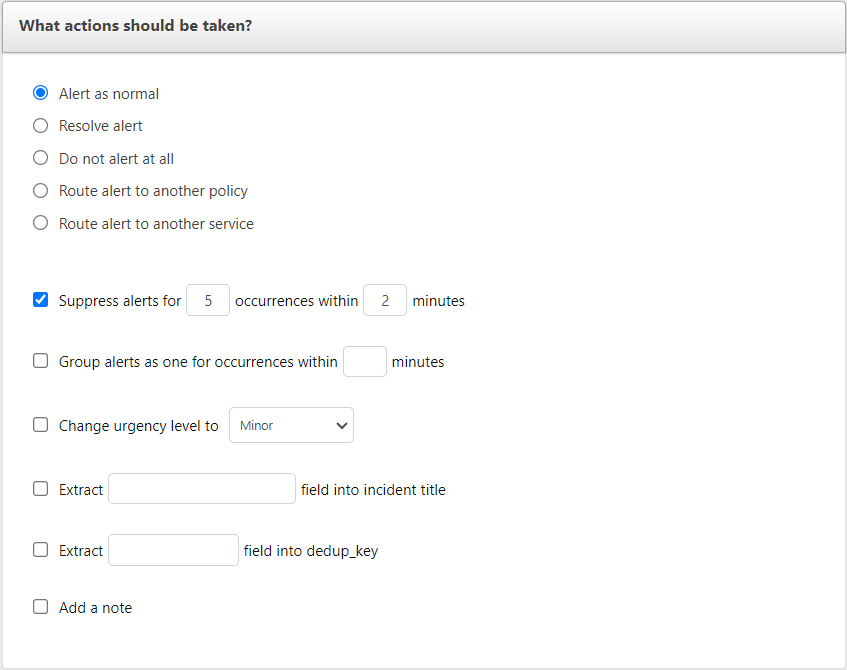
                                <h5 style="font-size: 16px;"> Suppress alerts </h5>
                                <div>
                                    <img src="https://taskcallapp.com/images/info-site/web-snapshots/services/ServiceDetails.png" style="width: 100%;">
                                </div>
                                <div>
                                    <p style="font-size: 13px;">
                                        Suppress unnecessary alerts with “Conditional Routing” or configure “Services” to use AI and automatically group similar alerts into one incident. Take care of the extra noise so your responders can focus on what matters.
                                    </p>
                                    <a href="https://www.taskcallapp.com/tutorials/suppress-repeating-alerts" target="_blank" style="font-size: 12px; font-weight: 600;"> Watch Demo </a>
                                </div>
                            </div>
                            <div style="margin-bottom: 50px;">
                                <h5 style="font-size: 16px;"> Extract additional details from alert </h5>
                                <div>
                                    <img src="https://taskcallapp.com/images/info-site/web-snapshots/conditional-routing/ConditionalRoutingActions.png" style="width: 100%;">
                                </div>
                                <div>
                                    <p style="font-size: 13px;">
                                        Insightful information might be available in certain fields of alerts that TaskCall does not inherently process. Extract them and update the title or description of the incident to help responders understand the problem faster.
                                    </p>
                                    <a href="https://www.taskcallapp.com/tutorials/content-based-delegation-with-conditional-routing" target="_blank" style="font-size: 12px; font-weight: 600;"> Watch Demo </a>
                                </div>
                            </div>
                        </div>
                    </div>
                    <div style="background-color: #00CC67; color: white; text-align: center; padding: 8% 10%;">
                        <p style="margin: 0px;">
                            Not every alert matters. <br/> Contextualize them with TaskCall so you can focus on what matters the most.
                        </p>
                        <br/><br/>
                        <a href="https://docs.taskcallapp.com/noise-reduction/v1/conditional-routing" target="_blank" style="text-decoration: none; color: white;padding: 10px 20px; border: 1px solid white; border-radius: 5px;" target="_blank"> Learn More </a>
                    </div>
                    <div style="background-color: #CACACA; padding: 4%; text-align: center;">
                        {0}
                    </div>
                    <div style="background-color: #003366;">
                        {1}
                    </div>
                </div>
            </div>
        </body>
    </html>
    '''.format(get_social_media_links(), get_onboarding_disclaimer(recipient_id))
    return subject, content


def analytics_content(recipient_id):
    '''
    Onboarding email 5. Introduces analytics.
    :param recipient_id: unique ID that identifies the email recipient
    :return: (tuple) -> email subject, email body
    '''
    subject = 'Onboarding: Are you efficient?'
    content = '''
    <!DOCTYPE html>
    <html>
        <head>
            <title>Analyze how effective your incident response is and understand if your teams are overworked.</title>
        </head>
        <body>
            <div style="padding: 2.5%; background-color: #F3F3F3; font-family: sans-serif; font-size: 15px;">
                <div style="max-width: 800px; margin: auto;">
                    <div style="background-color: #0096FF; padding: 40px; color: white;">
                        <div style="text-align: center; margin-bottom: 30px;">
                            <img src="https://taskcallapp.com/images/logos/TaskCallCombinedLogoWhite.png" style="width: 100px">
                        </div>
                        <h4 style="text-transform: uppercase; font-size: 22px; font-weight: 600; text-align: center; padding: 5px 0px;">
                            Analytics for growth
                        </h4>
                        <hr style="border-top: 1px solid white; margin: 0 40%;"/>
                        <p style="font-size: 15px; padding: 5px; text-align: center;">
                            Analyze how effective your incident response is and <br/> understand if your teams are overworked
                        </p>
                    </div>
                    <div style="background-color: white;">
                        <div style="margin: 0px; padding: 5% 10%;">
                            <div style="margin-bottom: 40px;">
                                <h5 style="font-size: 16px;"> Incidents </h5>
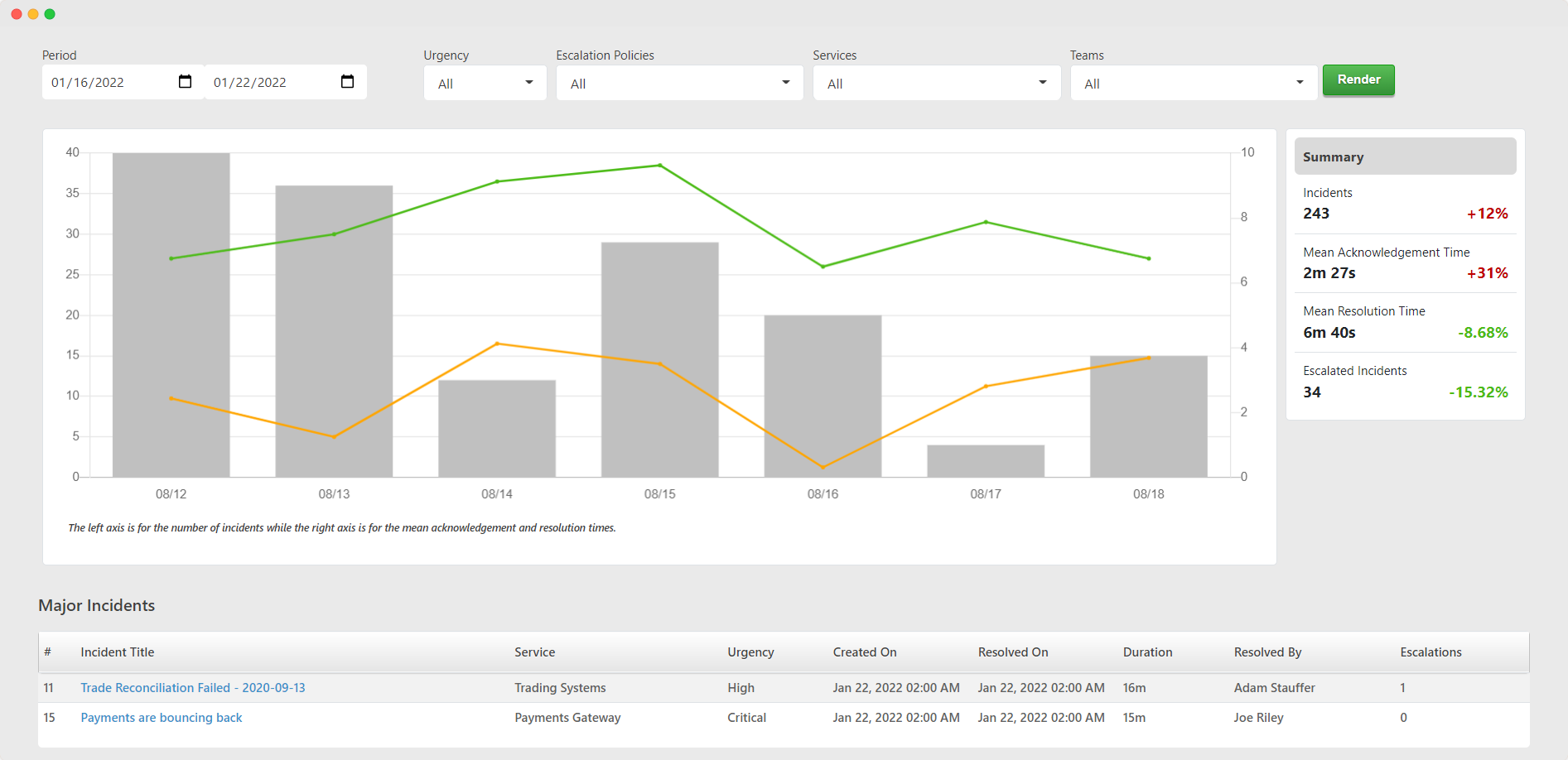
                                <p style="font-size: 14px;"> Understand how often incidents occur and how fast you respond to them. </p>
                                <div style="text-align: center;">
                                    <img src="https://taskcallapp.com/images/info-site/mock-snapshots/web/MacAnalyticsIncidents.png" style="width: 100%;">
                                </div>
                            </div>
                            <div style="margin-bottom: 40px;">
                                <h5 style="font-size: 16px;"> Impact </h5>
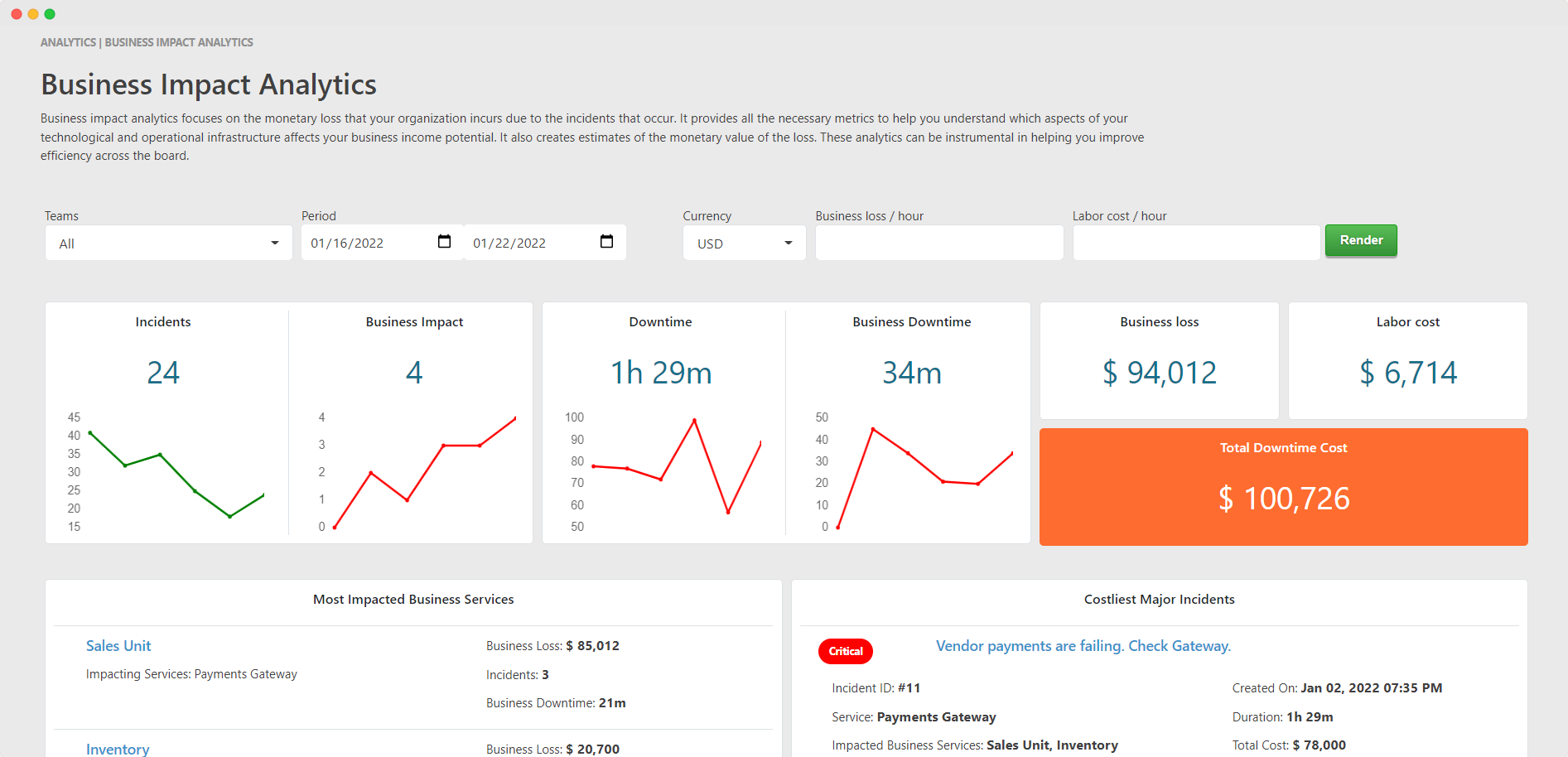
                                <p style="font-size: 14px;"> Understand which parts of your system are impacted the most and how much it is costing you financially. Evaluate how you should allocate resources. </p>
                                <div style="text-align: center;">
                                    <img src="https://taskcallapp.com/images/info-site/mock-snapshots/web/MacAnalyticsBusinessImpact.png" style="width: 100%;">
                                </div>
                            </div>
                            <div style="margin-bottom: 40px;">
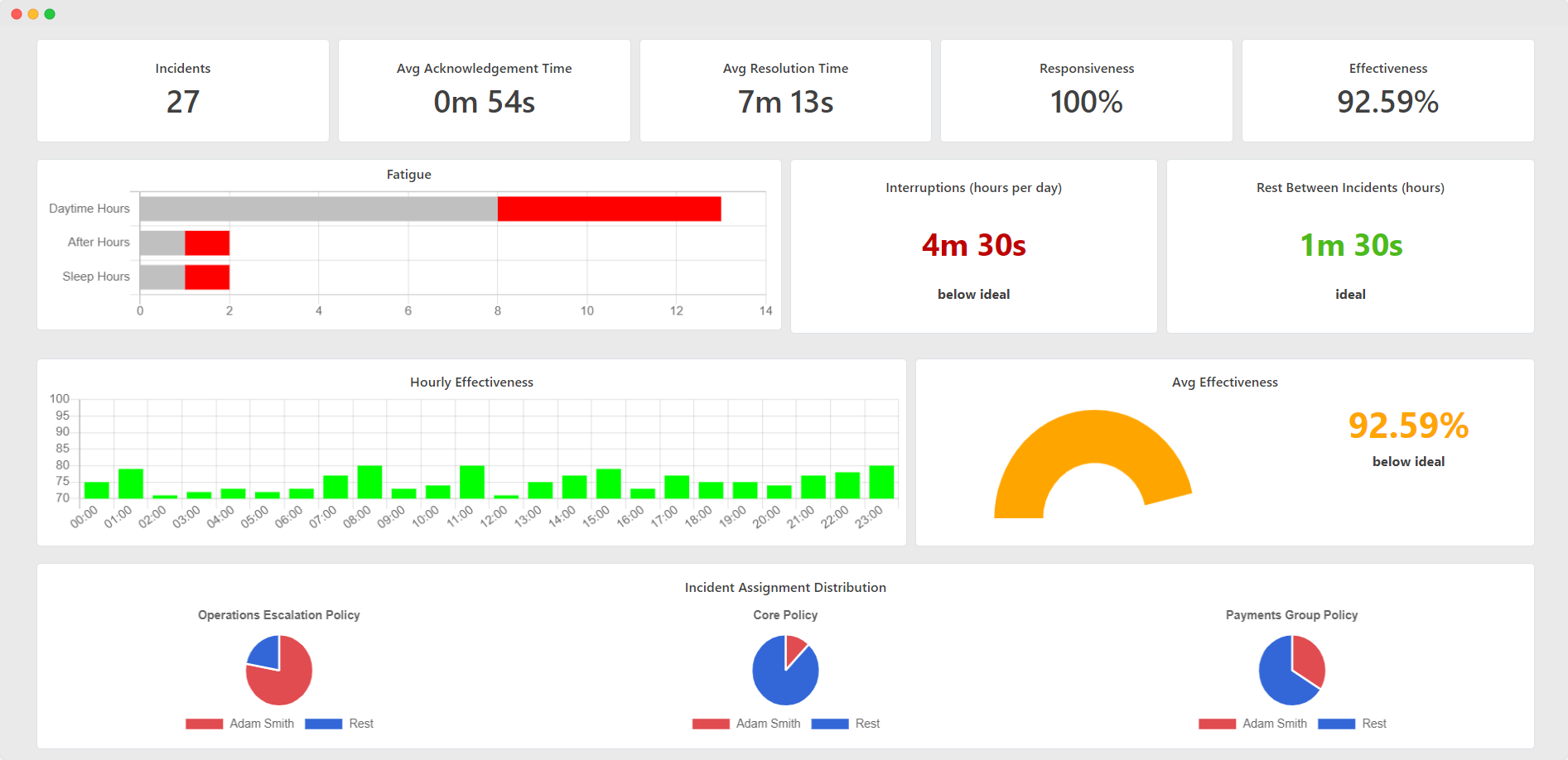
                                <h5 style="font-size: 16px;"> Team stress level </h5>
                                <p style="font-size: 14px;"> Understand whether your team is overworked or not. Know they are most effective. Learn about their work habits. See how they compare with other teams.</p>
                                <div style="text-align: center;">
                                    <img src="https://taskcallapp.com/images/info-site/mock-snapshots/web/MacAnalyticsUsers.png" style="width: 100%;">
                                </div>
                            </div>
                        </div>
                    </div>
                    <div style="background-color: #00CC67; color: white; text-align: center; padding: 8% 10%;">
                        <p style="margin: 0px; font-size: 16px;">
                            Make business decisions based on data.
                        </p>
                        <br/><br/>
                        <a href="https://taskcallapp.com/products/analytics" target="_blank" style="text-decoration: none; color: white; font-size: 15px; padding: 10px 20px; border: 1px solid white; border-radius: 5px;"> Learn More </a>
                    </div>
                    <div style="background-color: #CACACA; padding: 4%; text-align: center;">
                        {0}
                    </div>
                    <div style="background-color: #003366;">
                        {1}
                    </div>
                </div>
            </div>
        </body>
    </html>
    '''.format(get_social_media_links(), get_onboarding_disclaimer(recipient_id))
    return subject, content